Training and making prediction for a single allele
Load packages
Note that if you have installed the epinb package, then you do not need (and probably won’t want) to run sys.path.append("..").
[1]:
import sys
sys.path.append("..")

import epinb

import pandas as pd
Read in training data
The training data we used are from Keskin et al. You can substitute it with any data, be they your house data or other public data.
[2]:
training_data = pd.read_csv("../data/keskin/Keskin peptide lists filtered.csv")
training_data
[2]:
| Allele | Length | Peptide | |
|---|---|---|---|
| 0 | A0101 | 8 | ADMGHLKY |
| 1 | A0101 | 8 | ELDDTLKY |
| 2 | A0101 | 8 | FSDNIEFY |
| 3 | A0101 | 8 | FTELAILY |
| 4 | A0101 | 8 | GLDEPLLK |
| ... | ... | ... | ... |
| 186459 | G0104 | 24 | SASSLGGGFGGGSRGFGGASGGGY |
| 186460 | G0104 | 26 | GSGGSSYGSGGGSYGSGGGGGGHGSY |
| 186461 | G0104 | 27 | LLLPLLLLLLLLLGAGVPGAWGQAGSL |
| 186462 | G0104 | 27 | QEESLRQEYAATTSRRSSGSSCNSTRR |
| 186463 | G0104 | 28 | QEGETIELDKPVMAEGNVEVWLNSLLEE |
186464 rows × 3 columns
Train the model
As an example, we train a model for A0203.
[3]:
model = epinb.NBScore() # Create a model.
model = model.fit(training_data.loc[training_data['Allele'] == 'A0203', 'Peptide'])
Read in the test data
The test data are curated from IEDB. The positive examples are the experimentally verified binders. The negative examples are randomly generated from the source proteins. The ratio of positive to negative data is 1:99.
[4]:
test_data = pd.read_csv("../data/test-data/IEDB-A0203.txt", header=None, names=["peptide", 'label'])
test_data
[4]:
| peptide | label | |
|---|---|---|
| 0 | FGGHIRSV | pos |
| 1 | YLNSVVQV | pos |
| 2 | ILHDVVEV | pos |
| 3 | ALGSVVAV | pos |
| 4 | FLATIMGV | pos |
| ... | ... | ... |
| 259595 | LVPDYGMSNLT | neg |
| 259596 | LLGEATEGRIS | neg |
| 259597 | NCKCLKTLSVS | neg |
| 259598 | LLTRGDMRECV | neg |
| 259599 | RLLEKVEGTVR | neg |
259600 rows × 2 columns
Make the prediction
We use predict_log_odds to make the predicion.
[5]:
res = model.predict_log_odds(test_data['peptide'])
res
[5]:
array([ 10.50781303,  40.28167703,  41.24288408, ..., -35.1040942 ,
        -5.85900102, -35.84848082])
Interpretation
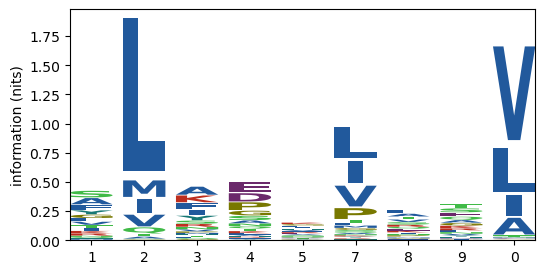
1st-order motifs
First, we can inspect the trained model by looking at the scoring matrices. First of all, we can check the 1st order motifs by using fit_details_1.
[6]:
model.fit_details_1().round(3)
[6]:
| 1 | 2 | 3 | 4 | 5 | 7 | 8 | 9 | 0 | |
|---|---|---|---|---|---|---|---|---|---|
| A | 0.139 | 0.009 | 0.164 | 0.052 | 0.051 | 0.011 | 0.098 | 0.076 | 0.093 |
| C | 0.002 | 0.000 | 0.000 | 0.002 | 0.005 | 0.001 | 0.007 | 0.007 | 0.003 |
| D | 0.000 | 0.000 | 0.002 | 0.157 | 0.038 | 0.003 | 0.012 | 0.013 | 0.000 |
| E | 0.002 | 0.000 | 0.003 | 0.187 | 0.060 | 0.009 | 0.062 | 0.111 | 0.001 |
| F | 0.111 | 0.001 | 0.131 | 0.012 | 0.065 | 0.023 | 0.010 | 0.024 | 0.003 |
| G | 0.075 | 0.002 | 0.017 | 0.089 | 0.086 | 0.017 | 0.023 | 0.075 | 0.001 |
| H | 0.021 | 0.000 | 0.025 | 0.016 | 0.077 | 0.004 | 0.031 | 0.022 | 0.001 |
| I | 0.055 | 0.070 | 0.107 | 0.013 | 0.078 | 0.217 | 0.048 | 0.011 | 0.113 |
| K | 0.051 | 0.001 | 0.139 | 0.040 | 0.086 | 0.010 | 0.058 | 0.074 | 0.000 |
| L | 0.068 | 0.737 | 0.020 | 0.022 | 0.084 | 0.298 | 0.126 | 0.046 | 0.246 |
| M | 0.016 | 0.079 | 0.025 | 0.003 | 0.010 | 0.022 | 0.025 | 0.012 | 0.004 |
| N | 0.026 | 0.000 | 0.047 | 0.049 | 0.045 | 0.010 | 0.044 | 0.046 | 0.000 |
| P | 0.000 | 0.000 | 0.026 | 0.146 | 0.022 | 0.105 | 0.043 | 0.009 | 0.000 |
| Q | 0.021 | 0.030 | 0.019 | 0.042 | 0.040 | 0.012 | 0.065 | 0.095 | 0.001 |
| R | 0.046 | 0.000 | 0.056 | 0.016 | 0.061 | 0.007 | 0.071 | 0.057 | 0.000 |
| S | 0.147 | 0.002 | 0.063 | 0.080 | 0.048 | 0.014 | 0.085 | 0.116 | 0.004 |
| T | 0.063 | 0.012 | 0.024 | 0.040 | 0.033 | 0.029 | 0.092 | 0.125 | 0.006 |
| V | 0.067 | 0.056 | 0.038 | 0.020 | 0.067 | 0.200 | 0.087 | 0.043 | 0.523 |
| W | 0.004 | 0.000 | 0.003 | 0.005 | 0.014 | 0.001 | 0.003 | 0.003 | 0.000 |
| Y | 0.086 | 0.000 | 0.092 | 0.010 | 0.030 | 0.009 | 0.010 | 0.034 | 0.000 |
To see the log odds for an AA at a given location, use what='log_odds'.
[7]:
model.fit_details_1(what='log_odds').round(3)
[7]:
| 1 | 2 | 3 | 4 | 5 | 7 | 8 | 9 | 0 | |
|---|---|---|---|---|---|---|---|---|---|
| A | 0.579 | -2.159 | 0.749 | -0.400 | -0.415 | -1.963 | 0.227 | -0.020 | 0.178 |
| C | -1.891 | -6.002 | -3.604 | -2.289 | -1.206 | -2.958 | -0.750 | -0.750 | -1.491 |
| D | -4.821 | -4.821 | -3.505 | 1.083 | -0.320 | -2.824 | -1.512 | -1.417 | -7.219 |
| E | -3.500 | -5.034 | -3.169 | 1.045 | -0.092 | -2.034 | -0.060 | 0.527 | -4.387 |
| F | 1.006 | -3.516 | 1.170 | -1.178 | 0.465 | -0.585 | -1.385 | -0.502 | -2.687 |
| G | 0.077 | -3.552 | -1.395 | 0.253 | 0.217 | -1.418 | -1.085 | 0.087 | -4.050 |
| H | -0.077 | -6.371 | 0.108 | -0.328 | 1.221 | -1.756 | 0.315 | -0.041 | -3.326 |
| I | -0.069 | 0.174 | 0.596 | -1.526 | 0.279 | 1.299 | -0.204 | -1.654 | 0.652 |
| K | -0.148 | -4.290 | 0.846 | -0.396 | 0.367 | -1.809 | -0.027 | 0.221 | -4.937 |
| L | -0.339 | 2.037 | -1.557 | -1.483 | -0.139 | 1.132 | 0.274 | -0.739 | 0.942 |
| M | -0.424 | 1.203 | 0.060 | -2.024 | -0.893 | -0.071 | 0.060 | -0.711 | -1.803 |
| N | -0.494 | -7.003 | 0.088 | 0.129 | 0.063 | -1.438 | 0.028 | 0.071 | -7.003 |
| P | -4.699 | -7.096 | -0.603 | 1.133 | -0.767 | 0.801 | -0.092 | -1.612 | -7.096 |
| Q | -0.608 | -0.285 | -0.723 | 0.066 | 0.028 | -1.148 | 0.502 | 0.881 | -3.875 |
| R | -0.137 | -7.211 | 0.055 | -1.193 | 0.155 | -2.013 | 0.296 | 0.083 | -7.211 |
| S | 0.747 | -3.377 | -0.104 | 0.147 | -0.373 | -1.628 | 0.199 | 0.515 | -2.873 |
| T | 0.129 | -1.516 | -0.841 | -0.308 | -0.498 | -0.648 | 0.515 | 0.822 | -2.174 |
| V | 0.008 | -0.176 | -0.560 | -1.212 | 0.002 | 1.098 | 0.262 | -0.445 | 2.058 |
| W | -1.101 | -5.717 | -1.322 | -0.841 | 0.172 | -2.283 | -1.206 | -1.454 | -5.717 |
| Y | 1.016 | -6.686 | 1.085 | -1.160 | -0.038 | -1.243 | -1.121 | 0.084 | -4.288 |
2nd order motifs
Similarly, you can check the frequencies, log odds, and the difference between the frequency and the expected values without correlation \(P(ab) - P(a)P(b)\).
[8]:
model.fit_details_2().round(3)
[8]:
| 20 | 12 | 57 | 23 | 10 | 90 | 35 | 80 | 30 | 24 | 37 | 34 | 58 | 89 | 45 | 38 | 78 | 49 | 79 | 15 | |
|---|---|---|---|---|---|---|---|---|---|---|---|---|---|---|---|---|---|---|---|---|
| AA | 0.0 | 0.002 | 0.001 | 0.001 | 0.016 | 0.009 | 0.011 | 0.011 | 0.015 | 0.001 | 0.004 | 0.011 | 0.007 | 0.006 | 0.003 | 0.016 | 0.001 | 0.005 | 0.001 | 0.007 |
| AC | 0.0 | 0.000 | 0.000 | 0.000 | 0.000 | 0.001 | 0.001 | 0.000 | 0.002 | 0.000 | 0.000 | 0.000 | 0.000 | 0.000 | 0.000 | 0.000 | 0.000 | 0.000 | 0.000 | 0.000 |
| AD | 0.0 | 0.000 | 0.000 | 0.000 | 0.000 | 0.000 | 0.003 | 0.000 | 0.000 | 0.001 | 0.000 | 0.019 | 0.000 | 0.001 | 0.002 | 0.003 | 0.000 | 0.001 | 0.000 | 0.004 |
| AE | 0.0 | 0.000 | 0.000 | 0.000 | 0.000 | 0.000 | 0.005 | 0.000 | 0.000 | 0.001 | 0.001 | 0.033 | 0.004 | 0.009 | 0.003 | 0.006 | 0.000 | 0.004 | 0.001 | 0.008 |
| AF | 0.0 | 0.000 | 0.000 | 0.003 | 0.000 | 0.000 | 0.013 | 0.001 | 0.000 | 0.000 | 0.003 | 0.003 | 0.001 | 0.005 | 0.004 | 0.002 | 0.000 | 0.001 | 0.000 | 0.009 |
| ... | ... | ... | ... | ... | ... | ... | ... | ... | ... | ... | ... | ... | ... | ... | ... | ... | ... | ... | ... | ... |
| YS | 0.0 | 0.000 | 0.000 | 0.000 | 0.000 | 0.000 | 0.005 | 0.000 | 0.001 | 0.000 | 0.000 | 0.006 | 0.003 | 0.001 | 0.001 | 0.006 | 0.001 | 0.000 | 0.001 | 0.005 |
| YT | 0.0 | 0.002 | 0.000 | 0.000 | 0.002 | 0.000 | 0.002 | 0.000 | 0.000 | 0.000 | 0.003 | 0.003 | 0.002 | 0.001 | 0.000 | 0.006 | 0.000 | 0.001 | 0.002 | 0.001 |
| YV | 0.0 | 0.005 | 0.004 | 0.000 | 0.037 | 0.015 | 0.003 | 0.007 | 0.042 | 0.000 | 0.016 | 0.002 | 0.001 | 0.001 | 0.001 | 0.007 | 0.002 | 0.000 | 0.000 | 0.009 |
| YW | 0.0 | 0.000 | 0.000 | 0.000 | 0.000 | 0.000 | 0.002 | 0.000 | 0.000 | 0.000 | 0.000 | 0.001 | 0.000 | 0.000 | 0.000 | 0.000 | 0.000 | 0.000 | 0.000 | 0.000 |
| YY | 0.0 | 0.000 | 0.000 | 0.000 | 0.000 | 0.000 | 0.005 | 0.000 | 0.000 | 0.000 | 0.001 | 0.001 | 0.000 | 0.001 | 0.000 | 0.001 | 0.000 | 0.000 | 0.000 | 0.003 |
400 rows × 20 columns
[9]:
model.fit_details_2('log_odds').round(3)
[9]:
| 20 | 12 | 57 | 23 | 10 | 90 | 35 | 80 | 30 | 24 | 37 | 34 | 58 | 89 | 45 | 38 | 78 | 49 | 79 | 15 | |
|---|---|---|---|---|---|---|---|---|---|---|---|---|---|---|---|---|---|---|---|---|
| AA | -2.663 | -1.347 | -1.627 | -1.627 | 0.958 | 0.337 | 0.612 | 0.577 | 0.908 | -1.627 | -0.446 | 0.577 | 0.081 | 0.020 | -0.798 | 0.982 | -2.017 | -0.265 | -1.627 | 0.137 |
| AC | -3.462 | -3.462 | -3.462 | -3.462 | -3.462 | -0.417 | -0.028 | -1.064 | 0.252 | -3.462 | -3.462 | -3.462 | -1.064 | -3.462 | -3.462 | -1.064 | -3.462 | -1.064 | -3.462 | -1.064 |
| AD | -4.678 | -2.281 | -4.678 | -4.678 | -4.678 | -4.678 | -0.284 | -4.678 | -4.678 | -1.244 | -4.678 | 1.538 | -2.281 | -1.634 | -0.568 | -0.416 | -4.678 | -1.244 | -4.678 | 0.031 |
| AE | -4.892 | -4.892 | -4.892 | -4.892 | -4.892 | -4.892 | 0.057 | -2.494 | -4.892 | -1.847 | -1.458 | 1.866 | -0.182 | 0.551 | -0.629 | 0.126 | -2.494 | -0.182 | -1.458 | 0.412 |
| AF | -4.409 | -4.409 | -4.409 | -0.015 | -2.012 | -4.409 | 1.422 | -0.975 | -4.409 | -4.409 | 0.101 | -0.015 | -0.975 | 0.386 | 0.300 | -0.478 | -4.409 | -0.975 | -4.409 | 1.033 |
| ... | ... | ... | ... | ... | ... | ... | ... | ... | ... | ... | ... | ... | ... | ... | ... | ... | ... | ... | ... | ... |
| YS | -4.032 | -4.032 | -1.635 | -4.032 | -1.635 | -4.032 | 0.843 | -4.032 | -0.598 | -4.032 | -4.032 | 0.985 | 0.230 | -0.988 | -0.988 | 0.985 | -0.598 | -1.635 | -0.988 | 0.763 |
| YT | -3.800 | -0.086 | -3.800 | -3.800 | -0.086 | -3.800 | 0.132 | -3.800 | -1.402 | -3.800 | 0.595 | 0.463 | 0.132 | -0.366 | -3.800 | 1.217 | -1.402 | -0.755 | -0.086 | -0.366 |
| YV | -3.993 | 0.882 | 0.622 | -3.993 | 2.854 | 1.976 | 0.402 | 1.149 | 3.002 | -3.993 | 2.026 | -0.061 | -0.559 | -0.559 | -0.948 | 1.260 | -0.279 | -3.993 | -3.993 | 1.450 |
| YW | -2.261 | -2.261 | -2.261 | -2.261 | -2.261 | -2.261 | 1.850 | -2.261 | -2.261 | -2.261 | -2.261 | 0.784 | -2.261 | -2.261 | 0.137 | -2.261 | -2.261 | 0.137 | -2.261 | 0.137 |
| YY | -3.230 | -3.230 | -3.230 | -3.230 | -0.832 | -3.230 | 1.566 | -3.230 | -3.230 | -3.230 | -0.185 | 0.204 | -3.230 | -0.185 | -3.230 | 0.204 | -3.230 | -0.832 | -3.230 | 1.165 |
400 rows × 20 columns
[10]:
model.fit_details_2('surplus').round(4)
[10]:
| 20 | 12 | 57 | 23 | 10 | 90 | 35 | 80 | 30 | 24 | 37 | 34 | 58 | 89 | 45 | 38 | 78 | 49 | 79 | 15 | |
|---|---|---|---|---|---|---|---|---|---|---|---|---|---|---|---|---|---|---|---|---|
| AA | -0.0004 | 0.0003 | 0.0006 | -0.0003 | 0.0030 | 0.0015 | 0.0028 | 0.0018 | -0.0001 | 0.0007 | 0.0021 | 0.0023 | 0.0016 | -0.0012 | 0.0000 | 0.0003 | -0.0003 | 0.0007 | 0.0003 | -0.0001 |
| AC | -0.0000 | 0.0000 | -0.0000 | -0.0000 | -0.0005 | 0.0005 | 0.0004 | 0.0000 | 0.0010 | -0.0000 | -0.0001 | -0.0003 | 0.0000 | -0.0007 | -0.0002 | -0.0008 | -0.0001 | 0.0000 | -0.0001 | -0.0003 |
| AD | 0.0000 | 0.0003 | -0.0002 | -0.0000 | 0.0000 | 0.0000 | -0.0032 | 0.0000 | 0.0000 | -0.0002 | -0.0005 | -0.0063 | -0.0002 | -0.0005 | 0.0003 | 0.0008 | -0.0001 | 0.0005 | -0.0001 | -0.0011 |
| AE | -0.0000 | -0.0001 | -0.0004 | -0.0000 | -0.0001 | -0.0001 | -0.0044 | 0.0003 | -0.0001 | -0.0009 | -0.0002 | 0.0028 | 0.0011 | -0.0019 | -0.0004 | -0.0043 | -0.0003 | -0.0015 | -0.0000 | -0.0005 |
| AF | -0.0000 | -0.0002 | -0.0012 | 0.0019 | 0.0000 | -0.0002 | 0.0026 | 0.0009 | -0.0004 | -0.0001 | -0.0002 | 0.0011 | 0.0006 | 0.0023 | 0.0009 | 0.0003 | -0.0001 | -0.0001 | -0.0003 | -0.0000 |
| ... | ... | ... | ... | ... | ... | ... | ... | ... | ... | ... | ... | ... | ... | ... | ... | ... | ... | ... | ... | ... |
| YS | 0.0000 | -0.0002 | -0.0000 | 0.0000 | 0.0001 | -0.0001 | 0.0006 | -0.0000 | 0.0008 | 0.0000 | -0.0013 | -0.0016 | 0.0002 | -0.0004 | 0.0003 | -0.0020 | 0.0004 | -0.0007 | -0.0003 | 0.0006 |
| YT | 0.0000 | 0.0005 | -0.0009 | 0.0000 | 0.0010 | -0.0002 | -0.0011 | -0.0001 | -0.0002 | 0.0000 | 0.0005 | -0.0010 | -0.0008 | -0.0001 | -0.0003 | -0.0027 | -0.0004 | -0.0004 | 0.0004 | -0.0017 |
| YV | 0.0000 | 0.0002 | -0.0021 | 0.0000 | -0.0084 | -0.0025 | -0.0030 | 0.0013 | -0.0058 | 0.0000 | -0.0025 | 0.0001 | -0.0014 | 0.0007 | 0.0001 | -0.0006 | 0.0008 | -0.0004 | -0.0004 | 0.0032 |
| YW | 0.0000 | 0.0000 | -0.0000 | 0.0000 | 0.0000 | 0.0000 | 0.0010 | 0.0000 | 0.0000 | 0.0000 | -0.0001 | 0.0003 | -0.0001 | -0.0000 | 0.0003 | -0.0003 | -0.0000 | 0.0004 | -0.0000 | -0.0008 |
| YY | 0.0000 | 0.0000 | -0.0003 | 0.0000 | 0.0004 | -0.0000 | 0.0019 | -0.0000 | -0.0000 | 0.0000 | -0.0000 | 0.0003 | -0.0003 | 0.0004 | -0.0003 | 0.0002 | -0.0001 | 0.0001 | -0.0003 | 0.0005 |
400 rows × 20 columns
You can also order the table by the values and look at the top ones by using the argument topk. It will return two tables, one for the amino acid combinations, and one for the values.
[11]:
motifs = model.fit_details_2('log_odds', topk=5)
display(*motifs)
| 20 | 12 | 57 | 23 | 10 | 90 | 35 | 80 | 30 | 24 | 37 | 34 | 58 | 89 | 45 | 38 | 78 | 49 | 79 | 15 | |
|---|---|---|---|---|---|---|---|---|---|---|---|---|---|---|---|---|---|---|---|---|
| 0 | LV | FL | HI | LF | FV | QV | FH | QV | FV | LP | FP | YP | HQ | HQ | PH | YH | IQ | EQ | LQ | FH |
| 1 | MV | YL | HL | LY | YV | TV | FG | HV | YV | LE | YP | FP | HT | HT | DH | FK | IT | PQ | IT | YH |
| 2 | LL | SL | HV | LK | SV | SV | YH | VV | AV | LD | KI | FD | HL | RQ | EH | FH | IH | PT | VQ | SH |
| 3 | LI | AL | HP | LA | AV | EV | AH | RV | KV | MP | YL | KD | FH | PW | FT | IS | DQ | IQ | AH | |
| 4 | IV | TL | NI | LI | GV | KV | SH | TV | IV | LN | FL | KE | WV | SQ | EK | YQ | LQ | DE | IS | FW |
| 20 | 12 | 57 | 23 | 10 | 90 | 35 | 80 | 30 | 24 | 37 | 34 | 58 | 89 | 45 | 38 | 78 | 49 | 79 | 15 | |
|---|---|---|---|---|---|---|---|---|---|---|---|---|---|---|---|---|---|---|---|---|
| 0 | 3.968404 | 2.995305 | 2.618943 | 3.133074 | 2.959139 | 2.944130 | 2.528115 | 2.531336 | 3.121548 | 3.144728 | 2.876409 | 2.806752 | 2.049579 | 1.560612 | 2.506171 | 1.700219 | 1.862923 | 2.101606 | 2.167193 | 2.305801 |
| 1 | 3.323167 | 2.989770 | 2.405264 | 2.996197 | 2.854202 | 2.881966 | 2.122911 | 2.455499 | 3.002108 | 3.123856 | 2.448491 | 2.460102 | 1.818278 | 1.532253 | 2.154133 | 1.628834 | 1.851526 | 2.094137 | 2.081669 | 2.102378 |
| 2 | 3.115853 | 2.785283 | 2.182888 | 2.846397 | 2.733449 | 2.759961 | 2.102378 | 2.445432 | 2.727398 | 3.026109 | 2.408002 | 2.209447 | 1.697751 | 1.408893 | 2.078523 | 1.616795 | 1.841238 | 2.005926 | 1.969686 | 2.084538 |
| 3 | 2.733461 | 2.594956 | 1.755693 | 2.817257 | 2.576541 | 2.476866 | 2.001333 | 2.439247 | 2.679017 | 2.366761 | 2.353638 | 2.140911 | 1.696202 | 1.383627 | 1.943675 | 1.609359 | 1.819307 | 1.971862 | 1.960324 | 1.940892 |
| 4 | 2.528408 | 2.180415 | 1.727443 | 2.440064 | 2.324494 | 2.306427 | 1.955743 | 2.413481 | 2.672438 | 2.244819 | 2.225964 | 2.085642 | 1.487226 | 1.371914 | 1.838149 | 1.553519 | 1.720833 | 1.855554 | 1.946959 | 1.586144 |
You can easily consolidate the two tables.
[12]:
motifs[0] + ' ' + motifs[1].round(2).astype(str)
[12]:
| 20 | 12 | 57 | 23 | 10 | 90 | 35 | 80 | 30 | 24 | 37 | 34 | 58 | 89 | 45 | 38 | 78 | 49 | 79 | 15 | |
|---|---|---|---|---|---|---|---|---|---|---|---|---|---|---|---|---|---|---|---|---|
| 0 | LV 3.97 | FL 3.0 | HI 2.62 | LF 3.13 | FV 2.96 | QV 2.94 | FH 2.53 | QV 2.53 | FV 3.12 | LP 3.14 | FP 2.88 | YP 2.81 | HQ 2.05 | HQ 1.56 | PH 2.51 | YH 1.7 | IQ 1.86 | EQ 2.1 | LQ 2.17 | FH 2.31 |
| 1 | MV 3.32 | YL 2.99 | HL 2.41 | LY 3.0 | YV 2.85 | TV 2.88 | FG 2.12 | HV 2.46 | YV 3.0 | LE 3.12 | YP 2.45 | FP 2.46 | HT 1.82 | HT 1.53 | DH 2.15 | FK 1.63 | IT 1.85 | PQ 2.09 | IT 2.08 | YH 2.1 |
| 2 | LL 3.12 | SL 2.79 | HV 2.18 | LK 2.85 | SV 2.73 | SV 2.76 | YH 2.1 | VV 2.45 | AV 2.73 | LD 3.03 | KI 2.41 | FD 2.21 | HL 1.7 | RQ 1.41 | EH 2.08 | FH 1.62 | IH 1.84 | PT 2.01 | VQ 1.97 | SH 2.08 |
| 3 | LI 2.73 | AL 2.59 | HP 1.76 | LA 2.82 | AV 2.58 | EV 2.48 | AH 2.0 | RV 2.44 | KV 2.68 | MP 2.37 | YL 2.35 | KD 2.14 | FH 1.7 | QQ 1.38 | PW 1.94 | FT 1.61 | IS 1.82 | DQ 1.97 | IQ 1.96 | AH 1.94 |
| 4 | IV 2.53 | TL 2.18 | NI 1.73 | LI 2.44 | GV 2.32 | KV 2.31 | SH 1.96 | TV 2.41 | IV 2.67 | LN 2.24 | FL 2.23 | KE 2.09 | WV 1.49 | SQ 1.37 | EK 1.84 | YQ 1.55 | LQ 1.72 | DE 1.86 | IS 1.95 | FW 1.59 |
If you want all combinations sorted, simply use topk=400.
[13]:
motifs = model.fit_details_2('log_odds', topk=400)
motifs[0] + ' ' + motifs[1].round(2).astype(str)
[13]:
| 20 | 12 | 57 | 23 | 10 | 90 | 35 | 80 | 30 | 24 | 37 | 34 | 58 | 89 | 45 | 38 | 78 | 49 | 79 | 15 | |
|---|---|---|---|---|---|---|---|---|---|---|---|---|---|---|---|---|---|---|---|---|
| 0 | LV 3.97 | FL 3.0 | HI 2.62 | LF 3.13 | FV 2.96 | QV 2.94 | FH 2.53 | QV 2.53 | FV 3.12 | LP 3.14 | FP 2.88 | YP 2.81 | HQ 2.05 | HQ 1.56 | PH 2.51 | YH 1.7 | IQ 1.86 | EQ 2.1 | LQ 2.17 | FH 2.31 |
| 1 | MV 3.32 | YL 2.99 | HL 2.41 | LY 3.0 | YV 2.85 | TV 2.88 | FG 2.12 | HV 2.46 | YV 3.0 | LE 3.12 | YP 2.45 | FP 2.46 | HT 1.82 | HT 1.53 | DH 2.15 | FK 1.63 | IT 1.85 | PQ 2.09 | IT 2.08 | YH 2.1 |
| 2 | LL 3.12 | SL 2.79 | HV 2.18 | LK 2.85 | SV 2.73 | SV 2.76 | YH 2.1 | VV 2.45 | AV 2.73 | LD 3.03 | KI 2.41 | FD 2.21 | HL 1.7 | RQ 1.41 | EH 2.08 | FH 1.62 | IH 1.84 | PT 2.01 | VQ 1.97 | SH 2.08 |
| 3 | LI 2.73 | AL 2.59 | HP 1.76 | LA 2.82 | AV 2.58 | EV 2.48 | AH 2.0 | RV 2.44 | KV 2.68 | MP 2.37 | YL 2.35 | KD 2.14 | FH 1.7 | QQ 1.38 | PW 1.94 | FT 1.61 | IS 1.82 | DQ 1.97 | IQ 1.96 | AH 1.94 |
| 4 | IV 2.53 | TL 2.18 | NI 1.73 | LI 2.44 | GV 2.32 | KV 2.31 | SH 1.96 | TV 2.41 | IV 2.67 | LN 2.24 | FL 2.23 | KE 2.09 | WV 1.49 | SQ 1.37 | EK 1.84 | YQ 1.55 | LQ 1.72 | DE 1.86 | IS 1.95 | FW 1.59 |
| ... | ... | ... | ... | ... | ... | ... | ... | ... | ... | ... | ... | ... | ... | ... | ... | ... | ... | ... | ... | ... |
| 395 | AS -4.95 | EA -4.89 | SG -4.83 | KL -5.01 | EA -4.89 | LD -4.89 | EG -4.77 | SG -4.83 | LT -4.93 | TL -4.93 | EA -4.89 | EA -4.89 | PD -4.17 | II -4.51 | YL -4.36 | EG -4.77 | AD -4.68 | VI -4.63 | GK -4.68 | EV -4.74 |
| 396 | KL -5.01 | AE -4.89 | AE -4.89 | EL -5.1 | LT -4.93 | AE -4.89 | ES -4.78 | LR -4.88 | LK -5.01 | GA -4.94 | VA -4.91 | LI -5.0 | EF -4.24 | AP -4.56 | VP -4.4 | GE -4.77 | DA -4.68 | LP -4.77 | AD -4.68 | PL -4.77 |
| 397 | LK -5.01 | AG -4.94 | EA -4.89 | GL -5.16 | AG -4.94 | AG -4.94 | GS -4.83 | LD -4.89 | LE -5.1 | EL -5.1 | LK -5.01 | LK -5.01 | PE -4.39 | GV -4.79 | FA -4.41 | GG -4.83 | EG -4.77 | AI -4.79 | GV -4.79 | ES -4.78 |
| 398 | EL -5.1 | AS -4.95 | AS -4.95 | SL -5.16 | LE -5.1 | LG -5.16 | DL -4.89 | AG -4.94 | LG -5.16 | GL -5.16 | LE -5.1 | EL -5.1 | VD -4.53 | GG -4.83 | RE -4.5 | LD -4.89 | GG -4.83 | IA -4.79 | EA -4.89 | EA -4.89 |
| 399 | GL -5.16 | LE -5.1 | SA -4.95 | AL -5.27 | EL -5.1 | LS -5.16 | EA -4.89 | LE -5.1 | LS -5.16 | SL -5.16 | LA -5.27 | LV -5.12 | GD -4.56 | DL -4.89 | LE -5.1 | EL -5.1 | AG -4.94 | LD -4.89 | AL -5.27 | EL -5.1 |
400 rows × 20 columns
Evaluation
To evaluate the results, we need some utilities from scikit-learn. To install, in your terminal, activate the virtual environment you are running for this note book, and run conda install scikit-learn.
[14]:
from sklearn.metrics import roc_curve, roc_auc_score, auc, precision_recall_curve
import matplotlib.pyplot as plt
import bisect
[15]:
test_data['prediction'] = res
test_data
[15]:
| peptide | label | prediction | |
|---|---|---|---|
| 0 | FGGHIRSV | pos | 10.507813 |
| 1 | YLNSVVQV | pos | 40.281677 |
| 2 | ILHDVVEV | pos | 41.242884 |
| 3 | ALGSVVAV | pos | 25.334613 |
| 4 | FLATIMGV | pos | 39.310739 |
| ... | ... | ... | ... |
| 259595 | LVPDYGMSNLT | neg | -34.499987 |
| 259596 | LLGEATEGRIS | neg | -31.344300 |
| 259597 | NCKCLKTLSVS | neg | -35.104094 |
| 259598 | LLTRGDMRECV | neg | -5.859001 |
| 259599 | RLLEKVEGTVR | neg | -35.848481 |
259600 rows × 3 columns
[16]:
fpr, tpr, roc_thresholds = roc_curve(test_data.label, test_data['prediction'],
                                     pos_label='pos')
auroc = auc(fpr, tpr)

precision, recall, pr_thresholds = precision_recall_curve(test_data.label, test_data['prediction'],
                                     pos_label='pos')

ind_40_tpr = bisect.bisect(tpr, 0.4) # fpr = recall
def fpr_tpr_to_precision(fpr, tpr, neg_pos_ratio):
    return tpr / (neg_pos_ratio * fpr + tpr)
prec_at_40_tpr = fpr_tpr_to_precision(fpr[ind_40_tpr], tpr[ind_40_tpr], 99)

print(f"AUROC: {auroc:.4f}; Precision at 40% recall: {prec_at_40_tpr:.4f}")
AUROC: 0.9943; Precision at 40% recall: 0.9146
[17]:
plt.figure(figsize=(6, 3))
plt.subplot(1, 2, 1)

plt.plot(fpr, tpr, label = "AUC = %0.4f" % auroc)
plt.plot([0, 1], [0, 1], color="grey", linestyle="--")
plt.grid('both')
plt.xlim([0.0, 1.0])
plt.ylim([0.0, 1.05])
plt.xlabel('FPR')
plt.ylabel('TPR')
plt.title("ROC")
plt.legend(loc="lower right")

plt.subplot(1, 2, 2)
plt.plot(recall, precision, label = "AUC = %0.4f" % auroc)
plt.grid('both')
plt.xlim([0.0, 1.0])
plt.ylim([0.0, 1.05])
plt.xlabel('Recall')
plt.ylabel('Precision')
plt.title("Precision-recall curve")

plt.tight_layout()
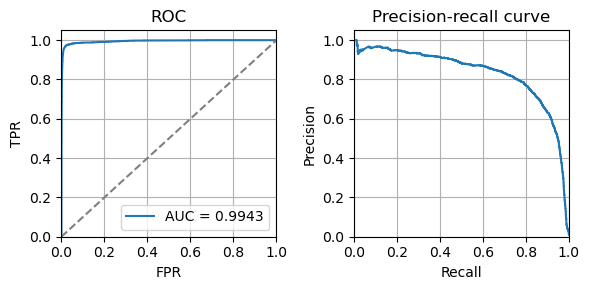
Visualization
For visualization, we need two additional packages: logomaker for motif logo and wordcloud for word clouds.
Logo plots
We use logo plots for 1st order motifs
[18]:
import logomaker
from scipy.stats import entropy

temp = model.fit_details_1().T.reset_index(drop=True)
temp = temp * (3 - entropy(temp.T).reshape([-1, 1]))

fig, ax = plt.subplots(1, 1, figsize=[6, 3])
ww_logo = logomaker.Logo(temp,
                         color_scheme='NajafabadiEtAl2017',
                        ax=ax,
                         vpad=.1,
                         width=.8)
ww_logo.ax.set_xticks([0, 1, 2, 3, 4, 5, 6, 7, 8], [1, 2, 3, 4, 5, 7, 8, 9, 0])
ww_logo.ax.set_ylabel('information (nits)')
# ww_logo.ax.set_ylim([0, 3])
display(ww_logo)
<logomaker.src.Logo.Logo at 0x7f9223ee9d00>
Word clouds
We use word clouds for 2nd order motifs
[19]:
import wordcloud

wc = wordcloud.WordCloud(width = 800, height = 375, min_font_size = 10, background_color ='white', collocations=False)
wc.fit_words(model.fit_details_2()['20'].to_dict())
plt.imshow(wc)
plt.axis("off")
[19]:
(-0.5, 799.5, 374.5, -0.5)